
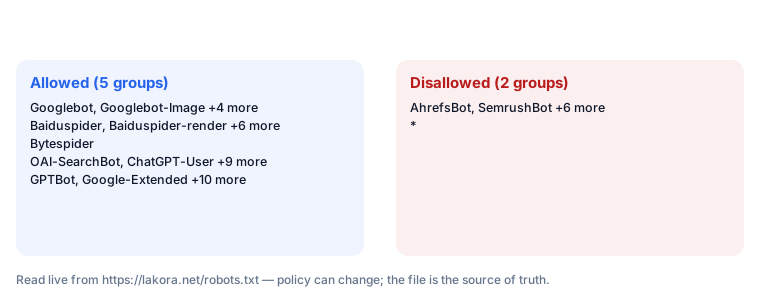
The most common mistake is treating every AI crawler the same. A training crawler collects pages to build a model's general knowledge. A retrieval crawler fetches a live page to answer a user's question right now, and that second job is where citations come from. If you block one, you may still get the other. Block the wrong one and you can lose the visits you actually wanted.
Training crawlers build knowledge; retrieval crawlers answer live queries
A retrieval crawler is a program that fetches a page in response to a user query, so the answer can quote or link that page. A training crawler is a program that collects pages in bulk to build or update a model. The first one is about the answer you see today. The second is about what the model knows later.
Here's the part people miss: blocking a training bot does not automatically block a retrieval bot. They often use different user-agents and run on different schedules. The robots.txt file — the plain-text file at the root of a site that tells automated clients which paths they may request — treats each user-agent separately. One line blocks one bot, not the whole family.
This matters because the business outcome is different. A retrieval visit can lead to a citation and a click. A training visit usually leads to nothing visible on your site, at least in the short term.
You can tell the two apart by user-agent and request pattern
The fastest check is the user-agent string in your server log. A user-agent is the label a client sends to identify itself. The Internet Engineering Task Force (IETF) defines the HTTP request headers in RFC 9110, and the User-Agent field is part of that standard. The label is self-declared, so treat it as a clue, not proof.
If the label says GPTBot, ClaudeBot, or PerplexityBot, you are most likely looking at a training or indexing crawl. If it says OAI-SearchBot or Perplexity-User, you are most likely looking at a retrieval or live-fetch request. The exact list changes as vendors update their documentation, so check the vendor's own page before you write a rule.
Timing is the second clue. Training crawls tend to be broad and slow, spread over weeks. Retrieval fetches tend to be narrow and tied to a query, often hitting one or two URLs rather than a whole section. If a single URL gets one request right after a user question, that pattern points to retrieval.
None of this is certain. A vendor can change a user-agent string or run both jobs from the same range. The log tells you what happened; it does not tell you why.
Each bot maps to a specific job, and the vendor's docs are the authority
The table below is the core of this article. Treat the "type" column as the vendor's stated purpose, not a permanent fact. Vendors update their docs, and the current in-force version prevails. Rows marked "both" mean the vendor documents more than one role, so check which user-agent actually appears in your log.
| Bot (user-agent) | Owner | Type | Purpose | Impact on citations | Worth optimising? |
|---|---|---|---|---|---|
| GPTBot | OpenAI | Training / indexing | Collects pages for model training and related use | Indirect — may shape what the model knows later | Yes, if you want your content in the model's knowledge base |
| OAI-SearchBot | OpenAI | Retrieval | Fetches live pages for ChatGPT search answers | Direct — can lead to a citation in a search answer | Yes, if ChatGPT search citations are a goal |
| ChatGPT-User | OpenAI | Retrieval (user-triggered) | Fetches a page when a user asks ChatGPT to open or read it | Direct — the page is used in that session | Yes, if you want pages readable on demand |
| ClaudeBot | Anthropic | Training / indexing | Collects pages for model development | Indirect — feeds general model knowledge | Depends on whether you want to be in that training set |
| PerplexityBot | Perplexity | Retrieval / indexing | Fetches pages to answer user queries with citations | Direct — often appears as a cited source | Yes, if Perplexity citations matter to you |
| Perplexity-User | Perplexity | Retrieval (user-triggered) | Fetches a page when a user asks Perplexity to open it | Direct — page used in that session | Yes, if you want pages readable on demand |
| Googlebot | Search indexing | Builds the search index used by Search and AI features | Indirect but broad — feeds many surfaces | Yes, always — it is the base layer |
Two rows deserve a closer look. PerplexityBot and Perplexity-User are not the same thing. Perplexity's own documentation describes PerplexityBot as the crawler that indexes pages for its answer engine, and Perplexity-User as the fetcher used when a person asks Perplexity to open a specific page. Blocking one does not block the other.
The same split exists at OpenAI. GPTBot is documented as the training crawler; OAI-SearchBot is documented as the search crawler; ChatGPT-User is documented as the user-triggered fetcher. If you write one rule for "OpenAI" you will probably miss at least one of them.
Robots.txt rules are per user-agent, and the wildcard group is the trap
Robots.txt rules are simple: a User-agent line names the bot, and Allow or Disallow lines set the paths. The Robots Exclusion Protocol is described in RFC 9309, published by the IETF. The standard says a crawler should obey the group that matches its user-agent, and should fall back to the wildcard group if no specific match exists.
That fallback is where accidents happen. A site that writes User-agent: * followed by Disallow: / blocks every bot that is not named separately. If you add a named group for GPTBot but forget OAI-SearchBot, the wildcard rule may still block the search bot. The fix is to name each bot you care about, and keep the wildcard group permissive.
Here is a copy-paste starting point. It allows the retrieval bots and the search indexer, and leaves training bots as a choice. Replace the comment lines with your own decision.
User-agent: GPTBot
Allow: /
User-agent: OAI-SearchBot
Allow: /
User-agent: ChatGPT-User
Allow: /
User-agent: ClaudeBot
Allow: /
User-agent: PerplexityBot
Allow: /
User-agent: Perplexity-User
Allow: /
User-agent: Googlebot
Allow: /
If you want to block training but keep retrieval, change only the training lines. For example, set Disallow: / under GPTBot and ClaudeBot, and leave OAI-SearchBot, ChatGPT-User, PerplexityBot and Perplexity-User allowed. That is a policy choice, not a technical one.
Most accidental blocks happen at the edge, not in robots.txt
The most common way sites block AI crawlers is by accident. A security plugin or CDN rule blocks "bad bots" and sweeps up AI crawlers in the same list. A staging site's robots.txt gets copied to production. A wildcard Disallow sits above the named groups, and nobody notices because the named groups look correct.
Cloudflare's bot management documentation is one place to check, because it lists verified bots and lets you set rules by category. If your CDN blocks a category, the robots.txt file never gets read. That means a correct robots.txt can still produce zero retrieval visits. Check the edge layer before you blame the file.
Server-side rate limits are another quiet blocker. A retrieval fetch is often a single request, so a strict per-IP limit can return a 429 status code — "Too Many Requests", defined in RFC 6585 — before the bot ever sees the page. A 429 is not a block in robots.txt terms, but it has the same effect on the citation.
Decide what to allow from your business goal, not from a bot list
Start with the business goal, not the bot list. If you want citations in AI answers, the retrieval bots need access to the pages you want quoted. That usually means your product pages, documentation, and comparison pages. If you want your brand in the model's general knowledge, the training bots need access too — but that is a longer game with no visible return on your site.
If you sell content, licensing, or data, the training decision is a commercial one. Blocking training bots is a legitimate choice. Just do it with named rules, and keep the retrieval rules separate, so you do not lose the citations by accident.
If you run a small site and want to be found, allowing both is the simpler path. The cost of a training crawl is bandwidth; the cost of a blocked retrieval crawl is invisibility in the answer. Weigh those two against each other before you copy a blocklist from a forum.
Run this checklist before you ship a robots.txt change
Before you ship a robots.txt change or a bot-management rule, run this checklist. It takes about ten minutes and catches most of the mistakes above.
- Open the live robots.txt at the root domain and confirm it is the file you edited, not a cached or staging copy.
- List every AI user-agent you intend to allow, and confirm each has its own group with no wildcard override above it.
- Check the CDN or security plugin for a bot category that blocks AI crawlers before robots.txt is read.
- Pull a week of server logs and search for the user-agent strings in the table, so you know which bots actually visit.
- Test with the vendor's own documentation, not a third-party list, because user-agent strings change.
- Write down the date of the change and the reason, so the next person can tell a policy block from an accident.
If a bot you expected does not appear in the logs after two to three weeks, check the edge layer first, then the robots.txt group, then the page itself. A 404 or a login wall will stop a retrieval fetch just as fast as a Disallow line.
Key Facts at a Glance
- Training crawlers collect pages to build model knowledge; retrieval crawlers fetch a live page to answer a query now.
- GPTBot, ClaudeBot and PerplexityBot are documented as training or indexing crawlers; OAI-SearchBot and Perplexity-User are documented as retrieval or user-triggered fetchers.
- Robots.txt groups are per user-agent, and the wildcard group can override a named group you forgot to add (RFC 9309).
- CDN bot categories and rate limits can block a crawler before robots.txt is read.
- Blocking a training bot does not automatically block the retrieval bot from the same vendor.
- There is no public figure for the citation cost of blocking training crawlers; treat it as a policy choice.
What is the difference between a training crawler and a retrieval crawler?
A training crawler collects pages in bulk to build or update a model. A retrieval crawler fetches a live page to answer a specific user query, and that fetch is what can lead to a citation.
Should I block GPTBot or PerplexityBot?
It depends on your goal. If you want citations in AI answers, keep the retrieval bots allowed and treat the training decision as a separate policy choice. Block with named rules, not a wildcard.
Does blocking GPTBot affect ChatGPT search citations?
Not directly, if OAI-SearchBot and ChatGPT-User stay allowed. They are documented as separate user-agents, so one rule does not cover the other. Check OpenAI's current documentation before you change the file.
How do I allow AI crawlers in robots.txt?
Add a User-agent group for each bot and an Allow: / line under it. Keep the wildcard group permissive, and check your CDN or security plugin for a bot category that blocks them first.
Which AI crawler does Perplexity use for live answers?
Perplexity's documentation describes PerplexityBot as the crawler that indexes pages for its answer engine, and Perplexity-User as the fetcher used when a person asks Perplexity to open a page. They are separate user-agents.