
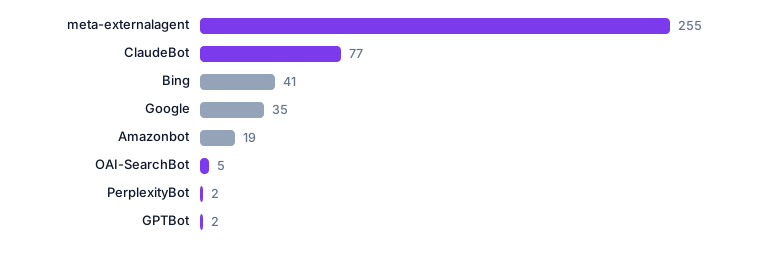
Most teams start their AI visibility work by buying a tool. The cheapest first step is already sitting on the server: the access log records every request, including the ones that identify themselves as AI crawlers, and it costs nothing to read.
Your own access log is the only complete record of which engines visit you and what they fetch.
Start with the user agent, then treat it as a claim
A crawler announces itself in the user agent string. That is a claim, not a fact: anything can put GPTBot in its header, and some scanners do exactly that. The practical rule is to count named crawlers and unrecognised automation separately, and to never merge them into one comfortable number.
Two more lines matter as much as the agent: the path requested, and the timestamp. A crawler that fetches the same URL forty times in an hour is behaving differently from one that walks the sitemap, and the log shows the difference.
The five numbers worth tracking
- Requests, trailing 24 hours. The denominator. Without it, a crawler count means nothing.
- Recognised crawler requests. Only requests whose user agent matches a named engine or agent you have decided to recognise.
- Distinct named engines. Ten engines at 200 requests each is a different situation from one engine at 2,000.
- Unrecognised automation. Everything automated that did not identify itself. On a public site this is usually the largest bucket, and saying so keeps the rest honest.
- Requests to known scan paths. Credential files, admin panels, CMS probes. Report them separately, and never let them inflate crawler figures.
What the log cannot tell you
- Whether a page was indexed. Indexing happens inside the search engine, not on your server.
- Whether a passage was retrieved for an answer, or cited in one. Retrieval from a live index often does not touch your log at all.
- Whether any of it produced a visit, a lead or a sale. That needs a second measurement on your own side.
- Which engine an unprefixed agent belongs to. Guessing here is how reports get quietly wrong.
| Measure | What our own log shows | What it means |
|---|---|---|
| Requests, 24h | 65,084 | all traffic, crawler and human |
| Recognised crawler requests | 26,178 | 40% of the window |
| Distinct named engines | 10 | counted by user agent |
| Unrecognised automation | 31,000+ | unverified by definition |
| Known scan paths | 29,000+ | blocked at the edge, counted separately |
The figures above are from this site's own 24-hour window on 26 September 2026 and are published as a dated record at /reports/, not as an industry benchmark.
A ten-minute routine
- Take one day of access logs and filter out your own monitoring.
- Group by user agent, then split named crawlers from everything else.
- Group the named crawlers by engine and by path.
- Compare with the previous seven days before drawing any conclusion.
- Write the date on the result. A crawler number without a date cannot be compared with anything.
If you would rather not build this by hand, the AI Crawler Log Analyzer does the grouping in your browser: paste a log sample, nothing is uploaded.
Source: this site's own nginx access log, aggregated every five minutes and published at /live/ and /data/live.json.Do I need analytics to count AI crawlers?
No. Crawler requests are server-side events. An access log records them whether or not any analytics script runs in a browser, and it records them without cookies.
Why separate unrecognised automation?
Because it is unverified. Folding it into named crawler figures produces a bigger, more confident and less true number. Reporting it separately is what keeps the named figures usable.
How often should I read the log?
Weekly is enough for a steady site. The value comes from the comparison over time, not from a single reading.
Related reading: Five Layers of Scanner Defence, Tested on Our Own Site · Layer 5: Closing the Loop in Public
More on this site: live signals · dated reports · how to verify us